
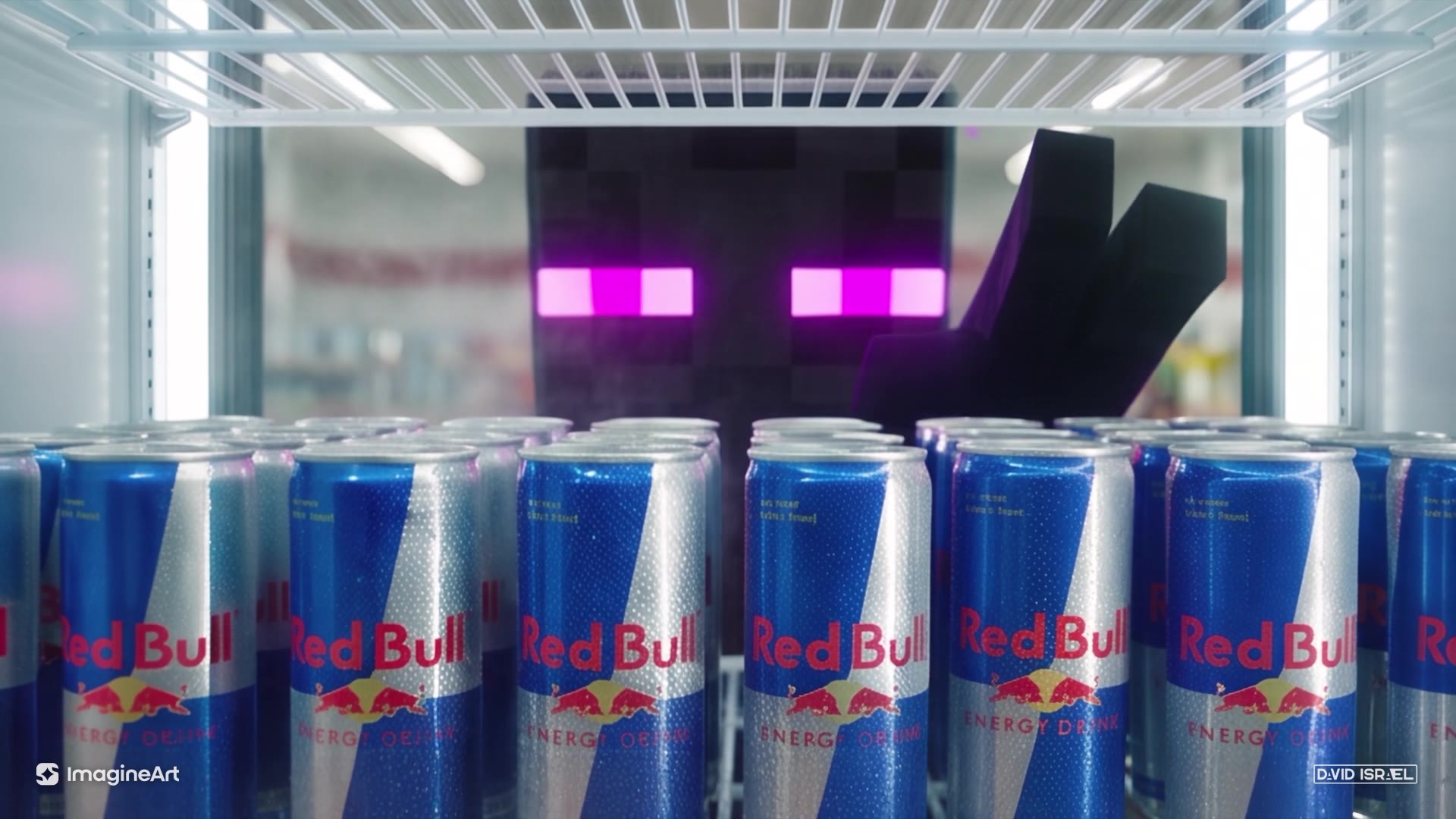
So this is a spec spot I made for Red Bull. Red Bull didn't hire me. I just wanted to see how close I could get to a real campaign. A Minecraft Enderman steps out of a Nether portal at 2am, stalks through a 7-Eleven like he's hunting the cashier, and it turns out he just wanted a Red Bull. He pays with a diamond, drinks it, grows wings and flies off.
Here's the thing: almost all of this happened in a conversation with Claude Opus 5.5 connected to the ImagineArt MCP. Claude generated the storyboards, cut the keyframes, drafted the prompt, built the generation workflow, made the music and did the sound design and finishing. My job was directing it: what to fix, what to keep, what felt wrong.
I'm going to walk you through the whole thing in five steps, with the prompts and the mistakes, so you can do it yourself.
What you need
- Claude (I used Opus 5.5) with the ImagineArt MCP connected. That gives Claude direct access to ImagineArt's image, video and music models from the chat.
- An ImagineArt account. The storyboards, the video generation and the music all ran there.
- Claude in Chrome (optional). This is how Claude built the workflow in ImagineArt Flow for me. You can also wire it up by hand.
- An idea with a turn in it. Mine was "horror movie where the monster just wants an energy drink."
Step 1: Lock the look before any motion
Don't start with video. Start with a storyboard.
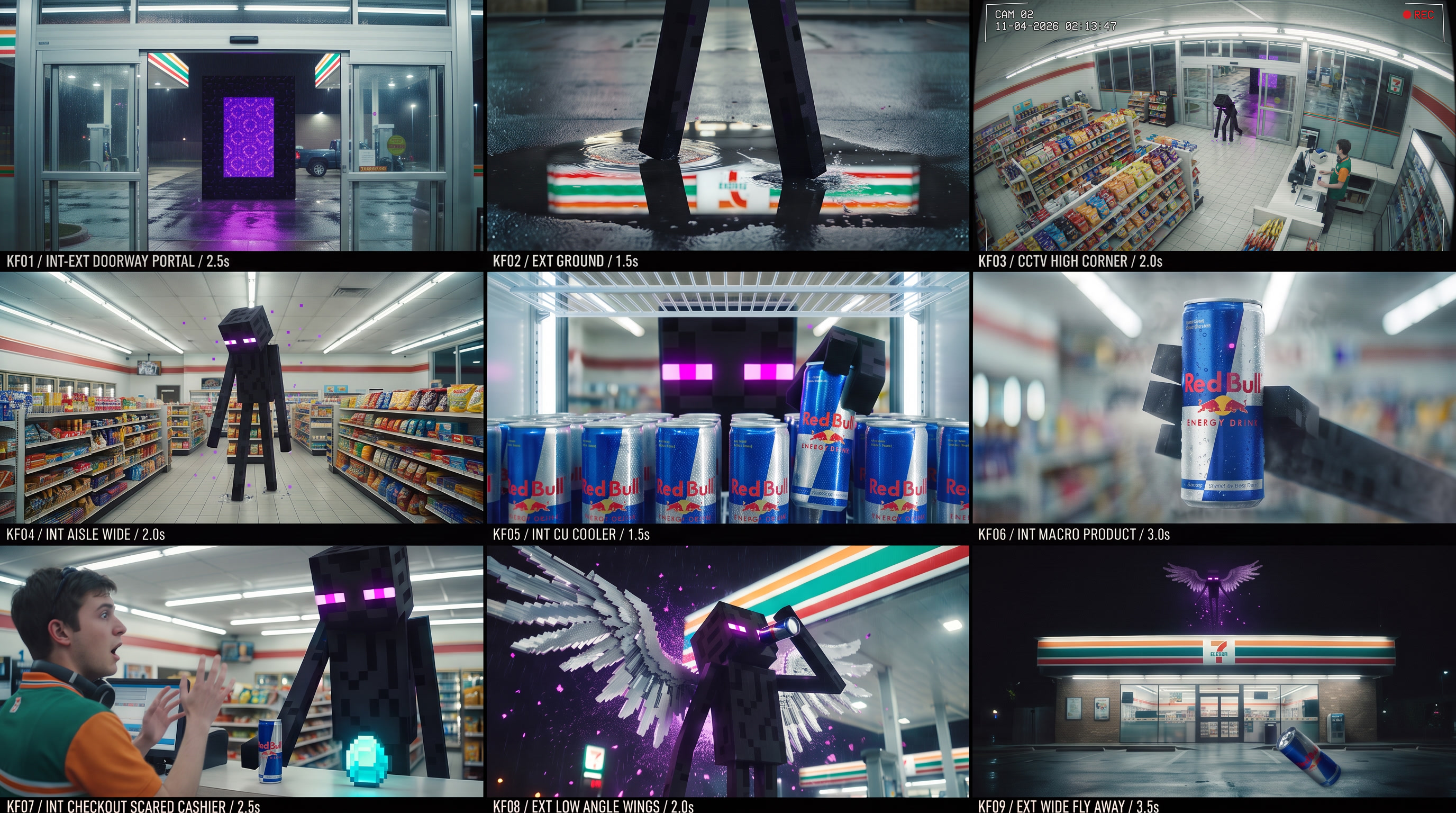
I had Claude generate a 3x3 cinematic storyboard grid through the ImagineArt MCP, using Nano Banana Pro at 16:9 and 2K. Nine keyframes of the same scene in one image. The reason you do it as a single grid is consistency. The Enderman, the store, the lighting and the color grade all come from one generation, so every panel matches.
The prompt for a grid like this needs a few things locked in:
- The scene in one sentence. Enderman, real 7-Eleven, 2am, light rain.
- The look of every element. The Enderman stays a flat blocky voxel character; everything else is photoreal.
- The environment and grade. Fluorescent tubes, wet asphalt, teal-and-orange.
- All nine panels written out row by row, with shot type and action.
- A consistency line at the end: same character, same store, same grade in every panel. Only the camera and action change.
Claude gave me two options first. I picked one, then asked for a Nether portal opening in frame one and wings at the end. Then I went through it like I would with a real storyboard artist. These were my actual notes:
"kf3 is a terrible angle for a security cam." "kf4 is junk. he's in the middle of a shelf." "the cashier should look afraid."
Honestly, this is where most of the quality comes from. The model will happily give you a frame that looks cool and makes no sense. Your job is to catch that now, when a fix costs one image, not later when it costs a 30-second generation.
One trick: when a single panel wouldn't change no matter how I prompted the grid, Claude just generated that one frame on its own (a proper high-corner CCTV angle) and dropped it into the grid. You don't have to regenerate all nine to fix one.
Generate your storyboard with Nano Banana Pro on ImagineArt ↗
Step 2: Cut it into references
@image1Doorway portal@image2Foot in puddle@image3High-corner CCTV@image4Aisle wide@image5Cooler discovery@image6Can close-up@image7Checkout and diamond@image8Wings@image9Fly-away
Once the grid is final, Claude crops it into nine separate images, one per keyframe, in story order. Those become your references for the video model.
In the prompt, each one gets a tag: @image1 through @image9. Write them with no space. @image1, not @image 1.
And here's the important part: each tag only controls the beat that mentions it. You're not saying "make a video that looks like these nine images." You're saying "this shot uses this frame." That's what keeps the model from mashing everything together.
Step 3: Write it like a shot list
This is the big one. The storyboard has nine frames. The finished prompt has 19 shots.
Claude drafted the prompt for Seedance 2.5, and I rewrote parts of it. Then I asked for more of a handheld feel, and we trimmed it to fit ImagineArt's 10,000-character limit. The final version came in at 9,874.
Here's how it's structured. Copy this structure even if your idea is totally different:
1. Camera rules up front. Before any action, tell the model how the whole thing is shot:
Every shot except the CCTV shot is handheld by an unseen, frightened operator inside the scene.
Never tripod, dolly, gimbal or crane; never smooth. [...] Every shot change is a hard cut,
never a dissolve or morph.
2. Characters and props bound to references. Say which image defines each character, and say what not to take from it. For example: "@image7 for the counter and framing only; do not copy the Cashier's pose or expression from it."
3. Beats with timestamps. Each beat gets a time range, numbered shots, and the reference it uses:
Shot 4 (4-5.5s): shaky medium-wide handheld from across the lot: the whole portal in frame,
obsidian edges and wet asphalt visible [...] a long blocky black leg pushes through and plants
its foot on the asphalt in front of the portal, trailing particles.
Hard cut.
4. End states. Every beat ends with what's visibly true at that moment:
End state: the Enderman holds one can.
This is the anti-drift trick. It gives the model a checkpoint, so it doesn't wander off between shots.
5. Sound cues inline. Seedance 2.5 generates native audio, so you can write sound right into the shots: <fluorescent buzz>, <door chime, pitched down and warped>, <one heavy heartbeat>.
6. A negative section. Say what you don't want: no smooth gimbal moves, no dissolves or morphs, the camera operator never appears, only one cashier ever exists.
The other thing I'd point out is the build-up. The first 22 seconds are played straight as horror. The audience thinks he's hunting the cashier. He locks eyes with him, the lights die as he walks past, and then he turns toward the coolers. The prompt directs that misdirection on purpose. The model won't invent your story for you. You have to write it.
Step 4: Generate in one pass, then review it like a director
This is the one part that happened in the browser. I had the workflow open in ImagineArt Flow, and I had Claude build it out for me using Claude in Chrome. It uploaded all nine keyframes, connected each one to the right reference slot on the Seedance 2.5 video node, hooked up the prompt, and set the duration to 30 seconds.
Then you hit generate. One generation, 30 seconds, all 19 shots.
Now, the first one wasn't right. And that's normal. You review it like a director reviewing a cut.
The big problem was at the 4-second mark. Instead of cutting to the leg stepping out of the portal, the camera kind of morphed into the portal surface. It was a weird zoom-dissolve thing, and it ruined the moment.
I had Claude look at the video and find the cause. The fix was two things:
- A global rule in the camera section: "Every shot change is a hard cut, never a dissolve or morph."
- Rewriting Shot 4 so it starts on a medium-wide of the whole portal, and ends with an explicit "Hard cut."
Next generation, it's a clean hard cut, and the leg plants on the asphalt like it should.
The second note was the cashier. His reaction at the counter was way too much: hands up, mouth open, cartoon scared. I wanted something smaller. He just freezes, his eyes flick from the diamond to the can, and he never looks up at its face. We rewrote that shot and had the Enderman place the diamond with its other hand. To be honest, Seedance still leans dramatic on that beat, so it's one I'd keep pushing on.
That's the loop. Generate, watch it frame by frame, figure out which line in the prompt caused it, fix that line, generate again. Don't rewrite the whole prompt every time.
Step 5: Finish it like a real spot
A generation isn't a commercial yet. This is the part people skip, and it's why so much AI video still looks like AI video.
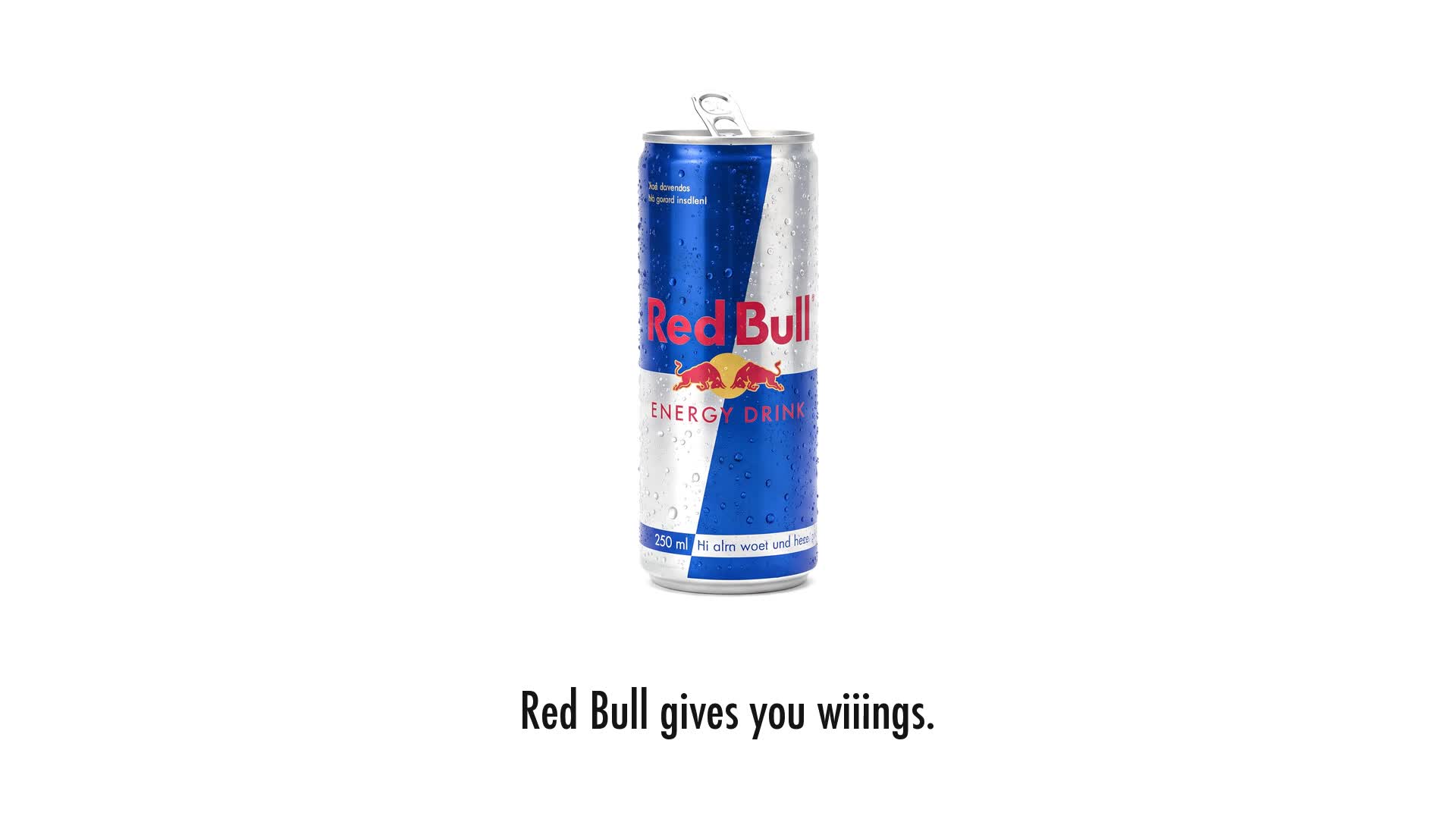
The end card. Claude downloaded three real Red Bull spots and studied how they end. Every one hard-cuts to a plain white card with a single can and "Red Bull gives you wiiings." in small black condensed type. Lowercase, three i's, with a period. So we did exactly that. The slogan fades in over the fly-away in Futura Condensed, then it hard-cuts to a white card with a can image generated on ImagineArt.
Music. The native audio from Seedance was good but quiet, and it went flat in the middle. So Claude generated two cues through the ImagineArt MCP:
- a low dread bed under the whole stalk, which cuts out for a beat of silence right before the payoff
- a big orchestral hit timed to land on the exact frame the wings burst open
Sound design. Claude added a reverse whoosh into the portal, a low thud when the leg hits the puddle, an impact under the wings, a cut accent on the end card and a sting on my logo. It used a tool called earshot to check the mix against professional launch films for things like dead air, silent gaps and loudness.
Mastering. -14 LUFS, true peak under -1 dB. That's the level for web and social so it doesn't get turned down or clip.
Branding. Small ImagineArt and DAVID ISRAEL logos in the bottom corners, then my director card and the ImagineArt outro.
What's not perfect
I'm going to be real with you. Watch the fly-away closely around 27 seconds and you'll catch the "camera operator's" hand and legs in frame. I literally banned that in the negative prompt, and it still showed up. Fixing it means regenerating that shot.
And you can't art-direct a single frame the way a compositor can. If a brand needs the can at an exact angle in frame 412, that's still a traditional pipeline job.
But for concepting, pitching, testing ideas, and fast variants? This is a real way to work now.
The short version
- Storyboard first. A 3x3 grid in Nano Banana Pro locks the character, location and grade.
- Cut it into references.
@image1to@image9, one per beat. - Write a shot list, not a caption. Camera rules, timestamped shots, end states, negatives.
- Generate, then review like a director. Fix the line that caused the problem, not the whole prompt.
- Finish it like a real spot. End card, music, sound design, mastering, branding.
And the video at the top of this page? Claude made that too, from the same project files.
If you make something with this, send it to me. I want to see it.
The complete generation prompt
The original 19-shot prompt, unchanged. The guide excerpts above explain the structure; this is the full text used for the 30-second generation.
Open the complete prompt
A 30-second ominous commercial in one continuous scene. Late at night, a blocky Minecraft Enderman comes through a Nether portal into the real world, stalks through a real 7-Eleven as if hunting, finds a can of Red Bull, pays the terrified cashier with a diamond, drinks it, grows wings and flies away. Shot like a found-footage horror film until the final payoff.

[Camera]
Every shot except the CCTV shot is handheld by an unseen, frightened operator inside the scene. Never tripod, dolly, gimbal or crane; never smooth. Constant breathing sway and jitter, crooked horizons corrected late, framing that drifts off the subject and gets pulled back, autofocus hunting, auto-exposure pumping on bright lights and purple glow, rain smears on the lens, motion blur on fast moves. On every scare the operator physically reacts: flinch, step back, stumble, whip-pan. Moves come from walking, crouching, backing away and peeking around things. Every shot change is a hard cut, never a dissolve or morph.

[Structure]
@image1 to @image9 are nine storyboard keyframes of this scene in story order. Each governs only the beat that cites it, selected per beat, never all at once. Follow each keyframe's subject, location, lighting, grade and screen direction, but reframe it as loose handheld coverage. Do not reproduce label strips, captions or KF numbers. Shots between keyframes are new coverage in the same world.

[Characters]
The Enderman corresponds to @image4 (full body) and @image8 (face and proportions); use only its appearance. A Minecraft Enderman as a flat voxel game character: about 3 meters tall, jet-black cube head, impossibly long thin rectangular black limbs, matte black pixel texture with faint purple speckles, two narrow glowing magenta pixel eyes, tiny purple square particles drifting off it. Always hard voxel edges, never realistic or smooth, but lit by the real lights, casting real shadows and reflections. Moves slowly: long pauses, then sudden snapping head turns.
The Cashier corresponds to @image7; use only his appearance: early twenties, 7-Eleven polo with orange, green and white panels, headphones around his neck. The only person visible in the store.
Only one Enderman and one Cashier exist in the video.

[Props]
The can corresponds to @image6: one silver-and-blue Red Bull can beaded with condensation; keep its graphics exactly. The diamond corresponds to @image7: one glowing cyan pixel Minecraft diamond. The wings correspond to @image8: large white-and-silver voxel wings of square pixel feathers, only from the wings beat on. The Nether portal corresponds to @image1: a tall rectangle of blocky black obsidian filled with swirling translucent purple.

[World and grade]
Everything except the Enderman, portal, diamond and wings is photoreal live action. A 7-Eleven at 2am in light rain: wet asphalt mirroring the striped canopy, a gas pump, a parked pickup. Inside: harsh fluorescent tubes, white tile, snack aisles, a back wall of glowing drink coolers. Teal-and-orange grade with a raw digital-camera look: shadow noise, blown fluorescent highlights, halos from a wet lens.

[Beats]

0-4s: The portal appears.
Shot 1 (0-1.5s) [@image1 framing, NO portal yet]: handheld just inside the store, looking out through the open glass doors at the empty wet lot, frame breathing. <fluorescent buzz> <light rain>. A tube flickers and the exposure pumps.
Shot 2 (1.5-2.5s): operator crouched low over a puddle, camera tilted. The puddle trembles, purple particles rise, black obsidian blocks snap into existence one cube at a time. The camera jolts back. <deep sub-bass rumble>
Shot 3 (2.5-4s) [@image1]: back at the doorway, the camera swings up late to find the frame as it ignites with swirling purple. Exposure blows out purple, then settles. <warping whoosh> The doors rattle.
End state: the portal stands alone in the lot, empty, as in @image1.

4-8s: Something steps out.
Shot 4 (4-5.5s): shaky medium-wide handheld from across the lot: the whole portal in frame, obsidian edges and wet asphalt visible, the surface swirling and rippling. Almost at once it bulges and a long blocky black leg pushes through and plants its foot on the asphalt in front of the portal, trailing particles.
Hard cut.
Shot 5 (5.5-7s) [@image2]: camera low on the ground, the purple portal glow behind. Both legs, fully out of the portal, step into the puddle, the sign's reflection shatters, the camera flinches.
Shot 6 (7-8s): shaky, too-close handheld on the cube head in profile, rain beading on the pixels, portal glowing behind. It turns straight to camera and the magenta eyes flare. The frame lurches back and blurs. <distorted reversed creature groan>
End state: the Enderman stands in the lot facing the store.

8-12s: Entry.
Shot 7 (8-9.5s): point of view from behind a snack display, only blurred chip bags in the foreground and no person, peeking at the Cashier scrolling his phone at the register. The tube above the entrance flickers; he looks up slowly. <door chime, pitched down and warped>
Shot 8 (9.5-12s) [@image3]: the only static shot: fixed CCTV from the high back corner, fisheye, washed out, scan lines. The doors open, the Enderman bends nearly in half to duck inside, and the image hitches and rolls with static. The Cashier is small at the counter, frozen.
End state: the Enderman is inside; the Cashier stares from the counter.

12-19s: The hunt. The audience should believe it is hunting the Cashier.
Shot 9 (12-13.5s) [@image4]: the operator backs away down a snack aisle as the Enderman walks slowly toward camera, each step bobbing the frame. Tubes above it die one by one and the exposure lurches darker. <tubes pop and buzz out>
Shot 10 (13.5-14.5s): handheld following its blocky fingers trailing a shelf edge, struggling to keep them framed. Chip bags crinkle and fall.
Shot 11 (14.5-15.5s): peeking through a gap between products, foreground out of focus. The cube head snaps around and the eyes lock onto the lens. The camera jerks back. <heartbeat sub pulse begins>
Shot 12 (15.5-16.5s): shaky close-up on the Cashier. He swallows and quickly drops his eyes to the counter.
Shot 13 (16.5-17.5s): too-close handheld on the Enderman's face. It holds on the Cashier, then twitches toward the back of the store; the camera whip-pans after its gaze. Cold blue light slides across its pixels. <compressor hum rises>
Shot 14 (17.5-19s): walking forward down the aisle at the Enderman's height toward the glowing coolers, step bob and sway, focus hunting on the glass. One door is fogged from inside.
End state: the Enderman stands at the coolers.

19-22.5s: The discovery.
Shot 15 (19-20.5s) [@image5]: camera wedged inside the cooler, rattling with the compressor, looking out past rows of Red Bull cans. Magenta eyes come into focus behind fogged glass. The door opens, fog pours out, a blocky hand closes on one can.
Shot 16 (20.5-22.5s) [@image6]: tight close-up of the can rising in the blocky hand in slow motion, held as steady as possible with a faint tremor, condensation running, focus settling on the graphics. Sound drops to near-silence. <one heavy heartbeat>
End state: the Enderman holds one can.

22.5-25s: The payment.
Shot 17 (22.5-25s) [@image7 for the counter and framing only; do not copy the Cashier's pose or expression from it]: tilted handheld over the Cashier's shoulder. The counter starts empty. The Enderman's right hand sets the can on the counter. Then its left hand comes down and places the diamond beside the can. The Cashier's fear is small and real: he goes completely still, hands frozen low near the register, mouth closed, breath held, eyes flicking from the diamond to the can but never up to its face. Its right hand lifts the can and it turns to the door; the camera pans after it, late. <door chime>
End state: the diamond sits alone on the counter.

25-30s: The wings.
Shot 18 (25-27.5s) [@image8]: low-angle handheld, the operator crouched in the rain under the canopy. The Enderman cracks the can <sharp hiss>, tips its head back and drinks. A beat where nothing happens; the camera creeps closer. Suddenly huge white-and-silver voxel wings burst from its back in an explosion of rain spray and purple particles, wider than the canopy pillars. The blast knocks the camera back and sprays the lens. <massive wing whoosh as soaring strings and choir hit>
Shot 19 (27.5-30s) [@image9]: the operator stumbles back into the lot, nothing blocking the lens, and tilts up fast, chasing the Enderman as it launches into the night sky above the sign, shrinking to a winged silhouette trailing purple. The camera loses it, swings down to the storefront as the crumpled can clatters onto the asphalt in the foreground. The portal is gone. The frame settles as the music decays into rain.

Last frame: matches @image9 with slight handheld drift: the empty storefront glowing at night, wet lot, crumpled Red Bull can on its side lower right, tiny winged silhouette high in the sky top center, open dark space above the store for an end tag added in post.

[Audio]
No dialogue or voiceover. 0-22s: sound-design dread: fluorescent buzz, rain, sub-bass, warped chime, creature warbles, the operator's shaky breathing and footsteps near the mic, a tightening heartbeat, near-silence at the reveal. At 25s the score erupts into euphoric strings and choir with a deep impact, decaying to rain by 30s.

[Negative]
No smooth dolly, gimbal or drone moves; no tripod shots except CCTV. No dissolves or morphs. The operator never appears: no head, hands, arms or knees in frame, no reflections. Only one young man ever appears: the Cashier. No new legible text beyond existing signage and can graphics. No label strips or panel borders. The Enderman is never realistic or humanoid. The Enderman never touches the Cashier. No wings before the wings beat. No portal inside the store. No words in the music.
Create in ImagineArt. Referral link. I may earn a commission if you purchase through it. Disclosure