
Muted preview loop · press play for the full film with sound
- Title
- David × Cone Man
- Type
- Character swap
- Runtime
- 0:15.1
- Frame
- 1536 × 2688 · 30 fps
- Generation
- MiniMax Hailuo H3
- Finish
- Topaz Upscale
Two familiar faces. One orange studio.
Watch the finished character-swap remix with David on the left and Cone Man on the right.
Made with MiniMax Hailuo H3 and Topaz Upscale in ImagineArt.
How I made this.
The remix and the tutorial are two stages. ImagineArt generated and upscaled the character swap; Claude Code helped assemble the walkthrough afterwards.
Video · Character consistency · Tutorial ready
The character-swap remix
Watch the 42-second walkthrough: assign the two identities, connect the source video and audio, generate with MiniMax Hailuo H3, then inspect and upscale the result. The exact final prompt is below.
- MiniMax Hailuo H3
- Topaz Upscale
- 42-second walkthrough
Get the final video-edit prompt ↓Open this workflow ↗
Local preview encode (480 × 854) for this review. The original high-quality walkthrough plays on theovercomer8.com ↗.
From inputs to finished video · four frames
F01Identity references + source
Prepare the inputs
Use a separate identity image for each performer. In this flow, David is assigned to the left and Cone Man to the right. Bring in the source video and its original audio as separate inputs.
F02ImagineArt / MiniMax Hailuo H3
Generate the identity swap
Connect the references, source clip, and audio to the video-generation node. The prompt sets the left/right identities and asks Hailuo H3 to retain the original performance, camera cuts, wardrobe, and audio.
F03ImagineArt / Topaz Upscale
Inspect, then upscale
Check the generated faces, movement, framing, and clothing before the upscale step. This finished result is 15.1 seconds at 1536 × 2688 and 30 fps. Its portrait framing and some clothing differ from the prompt.
F04Claude Code / Tutorial assembly
Make the walkthrough
Claude Code helped build the 42-second tutorial from the finished remix, the workflow capture, and motion graphics, showing the setup and steps you see here.
Its portrait framing and some clothing differ from the prompt. Prompt instructions describe the intended edit; the finished result above shows the actual output.
The exact video-edit prompt
Inside the identity swap
The final prompt is shown exactly as written, followed by the earlier character-study prompts. Prompt instructions describe the intended edit; the finished result above shows the actual output.
subject_definitions:
<Subject 1> is the replacement identity supplied in image1, assigned exclusively to the original man on the left in the source video. Use image1 for facial structure, skin tone, hair, facial hair, and recognizable identity; preserve the source character’s wardrobe, accessories, placement, and performance.
<Subject 2> is the replacement identity supplied in image2, assigned exclusively to the original man on the right in the source video. Use image2 for facial structure, skin tone, hair, facial hair, and recognizable identity; preserve the source character’s wardrobe, accessories, placement, and performance.
<Video 1> is reference-reel-h264.mp4, the direct editing source and frame-by-frame authority for composition, choreography, expressions, lip movements, camera, cuts, environment, lighting, clothing, and duration.
<Audio 1> is the complete original audio track embedded in <Video 1>, reused unchanged.
summary:
[video editing + reference generation + audio reuse] The target video is an edited version of <Video 1>. Replace the left performer’s identity with <Subject 1> from image1 and the right performer’s identity with <Subject 2> from image2. Reproduce the source as closely as possible in every other respect. Preserve its 15.00-second visual timeline, 1116 × 822 composition, 30 fps motion, original cuts, and complete source audio, including its approximately 15.03-second audio/container endpoint. The images define identities, not opening or ending frames.
retention_analysis:
<Subject 1>: fully_preserved — retain the identity defined by image1 throughout the left performer’s source role.
<Subject 2>: fully_preserved — retain the identity defined by image2 throughout the right performer’s source role.
<Video 1>: partially_preserved — change only the two performers’ identities; preserve all other visible content and temporal structure.
<Audio 1>: fully_copy — copy the entire original soundtrack as the complete final audio track.
detailed_description:
Preserve the live-action studio appearance of <Video 1>: a seamless saturated orange backdrop, soft frontal lighting, and a silver microphone suspended vertically between the two performers. Treat the source frames as the controlling reference wherever written descriptions are less precise.
[Shot 1] Match the opening two-person composition of <Video 1>. <Subject 1> stands on the left wearing the source’s amber-tinted glasses, tan jacket with orange textured front panels, light shirt, jewelry, and tan trousers. <Subject 2> stands on the right wearing the source’s tinted glasses, pale varsity jacket with striped cuffs and hem, light shirt, jewelry, and dark glossy trousers. Preserve their exact screen positions, relative scale, posture, and microphone placement. The camera holds the source framing. Reproduce the right performer’s forward arm extension and pointing, followed by his changing hand gestures, while the left performer moves from hands near his abdomen into the original rhythmic gestures. Match every head movement, glance, expression, mouth shape, and body sway to the corresponding source frame.
[Shot 2] At 00:04.267, the camera cuts to the source’s tighter two-person view. Preserve the left performer’s partial side profile and the right performer’s position near the right edge. Reproduce their original palm movements and alternating gestures precisely: the right performer extends and opens his hands, then moves one hand above the other; the left performer raises his hands and gestures in rhythm. Preserve occlusions, sleeve movement, jewelry movement, and the microphone’s exact position in this shot.
[Shot 3] At 00:07.567, the camera cuts to the source’s wider composition. Match the left performer’s finger gestures and mouth movements. The right performer sweeps his forearms across his body and turns until the back of his jacket faces the camera, then turns back toward the left performer. Preserve the timing, direction, and extent of that rotation, including the original jacket artwork and lettering, fabric folds, visible waistband, and arm positions. Maintain <Subject 2>’s identity through profile views and his return to facing the other performer.
[Shot 4] At 00:11.400, the camera cuts to the source’s closer two-person view. Reproduce the performers leaning toward one another and raising fingers near their faces, then returning toward the camera. Match the left performer’s raised finger and subsequent open-handed gestures and the right performer’s palm-up motion followed by his hand near his forehead. End on the exact source endpoint without an added pose, fade, or extension.
Across every shot, preserve source clothing and accessories rather than importing outfits or backgrounds from image1 or image2. Keep the identity assignments fixed through turns and overlapping gestures. Preserve all original visible lettering and artwork without rewriting them. Synchronize both performers’ lips and physical performance to <Audio 1>; do not regenerate, paraphrase, or add vocal content. Do not add camera movement, cuts, props, subtitles, effects, or new actions.
overall_soundscape:
Reuse <Audio 1> unchanged, retaining all original ambient sound, physical sounds, non-verbal vocal sounds, timing, stereo placement, and mix levels. Add no generated sound or replacement voices.
non_diegetic_music:
Retain any audience-only music already present in <Audio 1> exactly as recorded, including its instrumentation, rhythm, dynamics, and synchronization. Add no new score.
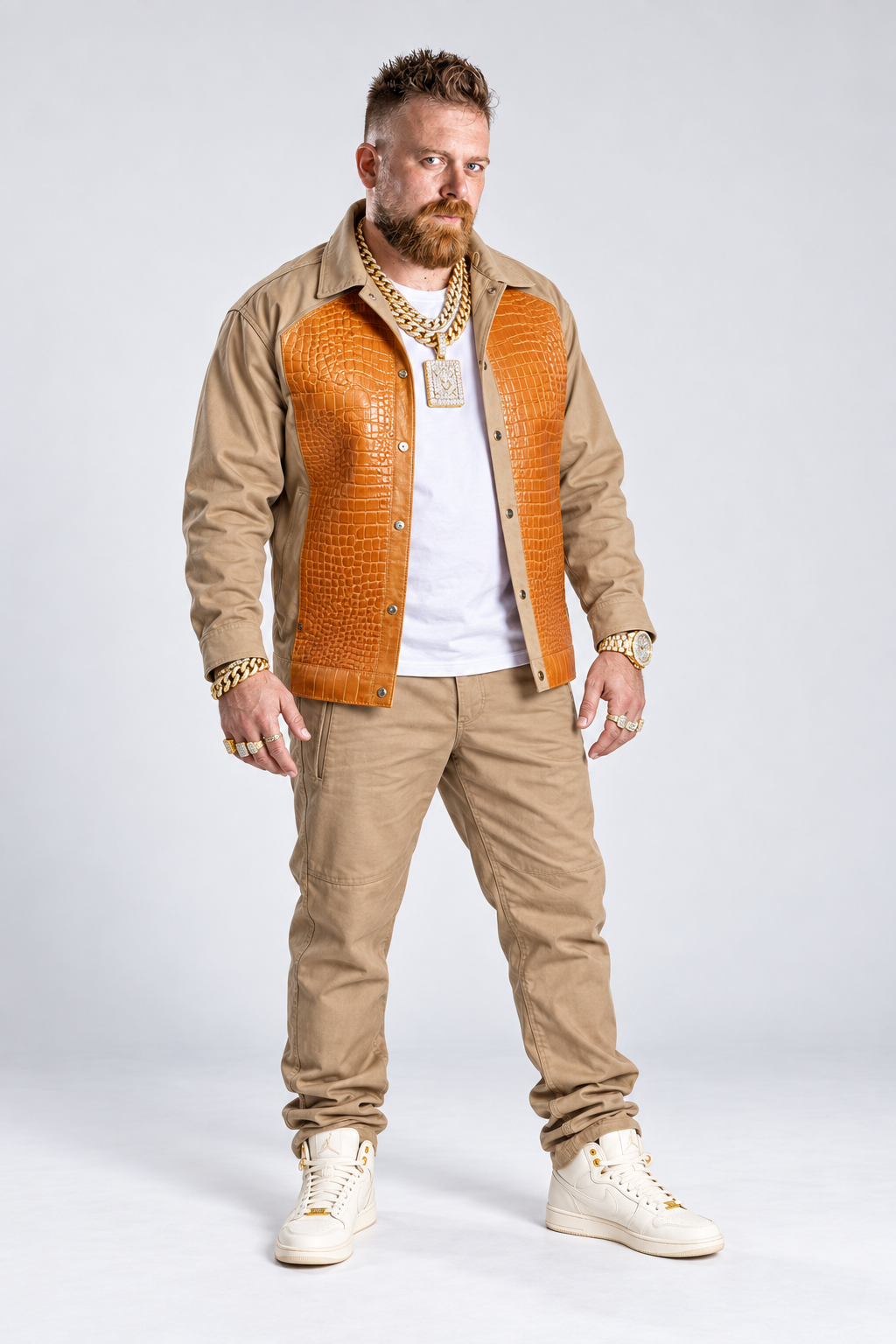
Development artwork from the preparation stage. The finished video and final editing prompt are shown above.
Use case: identity-preserve. Asset type: clean full-body character reference for remixing a two-performer hip-hop music reel. Create one photorealistic full-body reference image of David, from the top of his hair to the soles of both shoes, centered on a very light neutral-gray studio seamless, portrait 2:3 composition, generous clear margins. INPUT IMAGE 1 is the ONLY identity reference: preserve this exact man's facial structure, age, blue eyes, swept-up textured brown undercut hairstyle, ginger-brown medium-short full beard and mustache, skin tone, sturdy build and body proportions. Do not age him, do not give him gray hair or a long beard, do not add eyeglasses. INPUT IMAGE 2 is WARDROBE AND MUSIC-VIDEO VIBE ONLY: take the tan and burnt-orange streetwear silhouette of the LEFT performer's outfit, never either performer's face. Dress David in an open tan luxury overshirt with deep burnt-orange crocodile-embossed leather front panels, crisp white tee, matching relaxed tan trousers, and clean off-white leather high-top sneakers with discreet gold details. Make him proudly BLINGED OUT: two very thick yellow-gold Cuban-link chains, an additional substantial diamond-set chain with a bold faceted rectangular pendant, a diamond-encrusted gold watch, heavy gold bracelet, several chunky gold and diamond rings. Jewelry looks expensive and real, clearly visible, tasteful strong sparkle, no blown-out glare. David stands confidently almost front-on with a subtle three-quarter angle, feet separated naturally, arms slightly away from torso, both hands and fingers visible and relaxed, calm cool serious expression, eyes looking at camera. Studio fashion photography, crisp realistic natural facial detail, physically plausible jewelry, soft bright even frontal lighting and restrained floor contact shadow. No scene props, no microphone, no hat, no logos, no wording, no watermark, no additional people, no collage, no inset portrait. This should be an extremely usable high-quality motion-remix character reference, anatomically correct and not a concert poster.
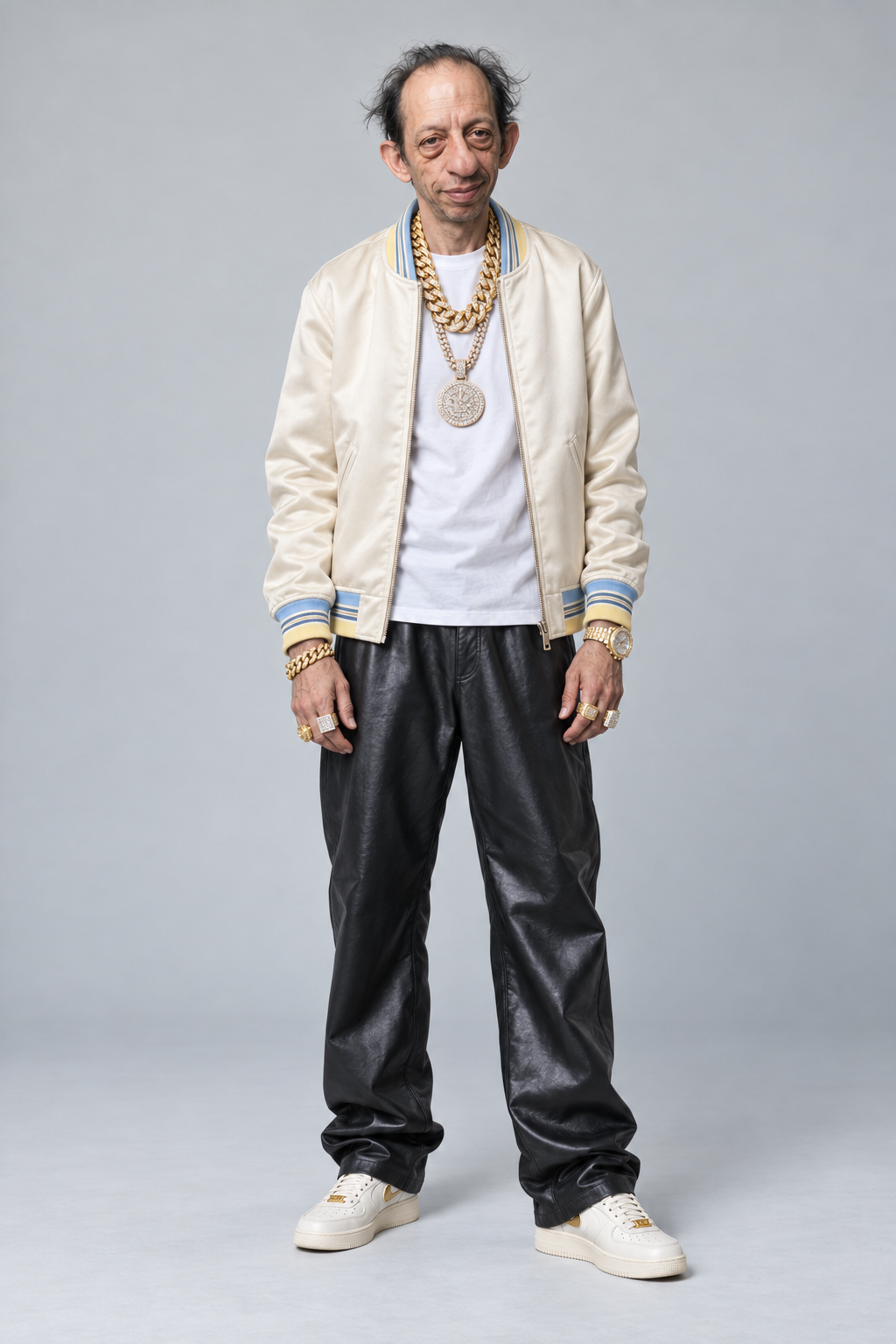
Development artwork from the preparation stage. The finished video and final editing prompt are shown above.
Use case: identity-preserve. Asset type: clean full-body character reference for remixing a two-performer hip-hop music reel. Create ONE photorealistic full-body reference image of the EXACT HUMAN MAN in INPUT IMAGE 1, top of head to soles of both shoes, centered on very light neutral-gray studio seamless, portrait 2:3 composition, generous clear margins. Input 1 is the authoritative CHARACTER IDENTITY sheet: preserve the exact older, slim, slightly stooped man's long narrow face, high balding forehead, messy wispy thinning dark hair at the sides, prominent long nose and ears, deep-set tired eyes and under-eye bags, lightly stubbled chin, natural wrinkles, pale skin, skinny body shape. He is called Cone Man but he is entirely HUMAN as depicted in this sheet. No traffic cone, no cone hat, no helmet, no mask, no sunglasses. Do not glamorize, rejuvenate, bulk up or replace his distinctive face. INPUT IMAGE 2 is WARDROBE AND MUSIC-VIDEO VIBE ONLY: take the cream varsity jacket and black baggy trousers silhouette of the RIGHT performer, never either performer's face. Outfit: premium ivory cream satin varsity bomber jacket worn open, pale yellow and icy-blue narrow striped ribbed collar/cuffs/hem, blank chest with no logo, clean white crew-neck tee, loose shiny black luxury trousers, off-white leather sneakers with a restrained gold accent. Make him unmistakably BLINGED OUT: two enormous yellow-gold Cuban-link chains, a substantial diamond-set long chain with bold round pavé diamond medallion, an iced-out gold wristwatch, a heavy gold bracelet, and several oversized gold-and-diamond rings. Jewelry looks real and expensive, clearly visible, controlled pinpoint sparkle with no blown-out glare. Preserve his unusual tired/deadpan facial character and add only a tiny knowing grin. He stands almost front-facing in a relaxed subtle three-quarter stance with feet separated naturally, arms slightly away from torso, both hands and all fingers fully visible and relaxed. Keep the body slim like the full-body view in the reference. Premium studio fashion photography, authentic fine skin texture, soft bright even lighting, restrained natural floor contact shadow. No scene props, no mic, no labels, no lettering, no watermark, no logo, no additional people, no collage, no inset. This is a consistent usable motion-remix character reference, not a poster. Face and body identity are the highest priority.
For your own version, use identity images and source footage you own or have permission to use.
Tools I use for this
- Identity references, source video and audioInputs to the identity swap; David on the left and Cone Man on the right.
- MiniMax Hailuo H3 in ImagineArtGenerate the character-swap video from the connected inputs and final editing prompt.
- Topaz Upscale in ImagineArtUpscale the generated result after inspection.
- Claude CodeAssemble the 42-second tutorial using the finished remix, workflow capture and motion graphics.
ImagineArt is where I connect the source clip, audio, and identity references. For this remix, I used MiniMax Hailuo H3 for the video edit and Topaz Upscale for the final output.
Try this process in ImagineArt ↗Open the character-swap workflow ↗
Referral link. I may earn a commission if you purchase through it. Disclosure